Building Deep Research Agents with LangGraph: From Search to Deep Research
Chamil Jay
A single search-and-summarize pass can answer straightforward questions, but it tends to break down when the task requires breadth, evidence coverage, and the ability to recognise what is still missing. Deep research is less about making one particularly clever model call and more about designing a workflow that can plan, gather evidence, assess that evidence, and deliberately search again when necessary.
In this tutorial, we will build a simple deep research agent pattern with LangGraph that plans, searches in parallel, reflects on evidence quality, loops when needed, and only then writes a final report. The architecture that I will talk about here is very similar to the architecture that I have used within the research team in my personal project FinAI.
The implementation is based on a real project and focuses on the architectural decisions that matter when moving beyond a single-agent prototype. This is not an absolute-beginner tutorial; it assumes you are already comfortable with Python, LLM applications, and the basic concepts behind LangGraph. The goal is to explain the reasoning behind the architecture and show the implementation patterns that you can reuse.
What We Are Building
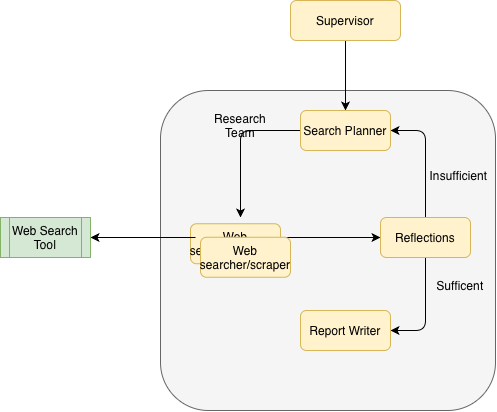
We will build the web-research layer of a larger multi-agent system and, along the way, look at five patterns that make the workflow substantially more robust:
- A supervisor-driven multi-team architecture
- A dedicated web research team with iterative loops
- Parallel search fan-out using LangGraph
Send - Additive state merging for parallel outputs
- Reflection-gated report writing
1. Start with the Architecture: Research as a Team
The first design decision is where research belongs. Rather than making the entire application one large graph, the web-research workflow is encapsulated as a team (graph) inside a larger supervisor graph. This gives the research capability a clear boundary: the supervisor decides when research is needed, while the research team decides how to conduct it.
Why this separation matters
- User requests enter through the supervisor.
- The supervisor routes web-heavy tasks to
Web_Search_Team. - Team output returns as a message so the supervisor can continue orchestration.
The result is a clean separation of concerns. The supervisor orchestrates teams; the research team orchestrates research steps. That distinction becomes increasingly valuable as the overall system grows.
2. Make State the Contract Between Research Steps
Before looking at the individual nodes, it is worth pausing on state. In a graph like this, state is more than a container for variables: it is the contract between stages of the workflow. If the state is poorly designed, parallel execution and iterative loops become difficult to reason about regardless of how good the prompts are.
class State(MessagesState):
    next: str
    web_researcher_reports: Annotated[list[dict], operator.add]
    user_query: str = ""
    next_node: str = ""
    payload: any = None

class FanoutState(TypedDict):
    next_node: str
    payload: any

# Create a separate function for dynamic routing
def route_to_next_node(state: FanoutState)->list[Send]:
    """This function returns Send objects for parallel execution"""
    return [
        Send(state['next_node'], {'payload': p})
        for p in state['payload']
    ]

class SearchQuery(BaseModel):
    query: str = Field(description="search query")
    search_reason: str = Field(description="The explaination for why the search is required")


class SearchOutput(TypedDict):
    query: str
    search_reason: str
    search_output: str

class WebSearcherState(TypedDict):
    user_query: str
    follow_up_query: str
    is_sufficient: bool
    search_outputs: Annotated[list[SearchOutput], operator.add]
    retry_count: int = 0
The important state decisions
Stateis the outer contract used by the top-level graph.WebSearcherStateis the internal team contract.search_outputsusesoperator.add, enabling automatic merge of parallel worker results.payloadis used as the transport field for fan-out tasks and final report content.
3. The Research Loop: Plan → Search → Reflect → Repeat → Write
The research team is deliberately structured around a loop rather than a straight line. We first plan what to search, execute those searches in parallel, inspect what we learned, and only then decide whether we have enough evidence to write.
class WebSearchTeam(TeamsBaseClass):
    """
    A class to build a web search team workflow using LangGraph.
    It initializes the search planner, web searcher, and reflections agents,
    and connects them in a workflow.
    """

    def __init__(self, llm:BaseChatModel)->None:
        self.llm = llm
        self.supervisor = None
        self.web_searcher = WebSeacher(self.llm)
        self.search_planner = SearchPlanner(self.llm, self.web_searcher, ["blog posts"])
        self.report_writer = ReportWriter(self.llm)
        self.reflections = Reflections(self.llm)
        self.reflection_router = ReflectionRouter(false_dest=self.search_planner, true_dest=self.report_writer)
        self.graph_builder = StateGraph(WebSearcherState, input_schema=State, output_schema=State)
        self.graph = None
        self.name = "Web_Search_Team"
        self.description = "A team of web researchers who search the web for information and write reports based on the findings. "
        self._build_graph()

    def _build_graph(self)->None:
        self.graph_builder.add_node(self.search_planner.name, self.search_planner)
        self.graph_builder.add_node(self.web_searcher.name, self.web_searcher)
        self.graph_builder.add_node(self.reflections.name, self.reflections)
        self.graph_builder.add_node(self.report_writer.name, self.report_writer)

        self.graph_builder.add_edge(START, self.search_planner.name)

        self.graph_builder.add_conditional_edges(
            self.search_planner.name,
            route_to_next_node,  # This function returns Send objects
            # No need to specify paths since Send handles routing
        )

        self.graph_builder.add_edge(self.web_searcher.name, self.reflections.name)
        self.graph_builder.add_conditional_edges(self.reflections.name, self.reflection_router)
        self.graph_builder.add_edge(self.report_writer.name, END)
        self.graph = self.graph_builder.compile()
The execution flow
- Planner creates a set of search tasks.
- Router fans tasks out to parallel web searches.
- Search outputs merge into shared state.
- Reflection checks evidence sufficiency.
- If insufficient, loop back with follow-up queries.
- If sufficient, write final report and end.
That feedback loop is the key difference between a search agent and a deep research workflow. The system is not simply asking an LLM to search harder; it is giving the model an explicit opportunity to recognise when its evidence is incomplete.
4. Inside the Loop: What Each Node Does
4.1 Search Planner
class SearchPlanner:
    def __call__(self, state: WebSearcherState)-> FanoutState:

        logger.info("Starting search planning...")
        llm_promopt = self._get_full_prompt(state)
        response = self.llm.with_structured_output(ListOfSearchQueries).invoke(llm_promopt)
        output = { 'payload'  : response.queries,
                   'next_node': self.searcher.name}
        return output

    def _get_full_prompt(self, state: State):
        system_prompt = self._get_system_prompt()
        if state.get("retry_count", 0) == 0:
            query = state["user_query"]
        else:
            query = state["follow_up_query"]

        messages = [{"role": "system", "content": system_prompt},
                    {"role": "user", "content": query}]

        return messages
The planner is responsible for turning a broad user request into a small set of research questions. It is intentionally separated from retrieval: the planner decides what evidence is needed, while the searcher decides how to retrieve it.
- Uses
user_queryon first pass - Uses
follow_up_queryon retries - Emits
FanoutStatewith a list of structured search queries
4.2 Fan-Out Router
def route_to_next_node(state: FanoutState)->list[Send]:
    """This function returns Send objects for parallel execution"""
    return [
        Send(state['next_node'], {'payload': p})
        for p in state['payload']
    ]
The planner produces multiple independent search tasks. The router converts those tasks into parallel graph executions using LangGraph’s Send mechanism.
- Creates one
Sendobject per planned query - Each worker receives one query payload
- Enables concurrent evidence collection
4.3 Web Searcher
class WebSeacher:
    def __call__(self, state: FanoutState)-> SearchOutput:

        logger.info("Starting web search...")

        q = state['payload']
        query_outputs= []
        user_prompt = {"messages": [{"role": "user", "content":
                                              f"search query- {q.query}, search_reason- {q.search_reason}"}]}
        response = self.search_agent.invoke(user_prompt)
        output = {"search_outputs": [{
            "query": q.query,
            "search_reason": q.search_reason,
            "search_output": response['messages'][-1].text()
        }]}
        return output
Each search worker has a deliberately narrow responsibility: take one planned query, retrieve evidence, and return a compact result that can be merged with the other workers.
- Consumes one
SearchQuery - Runs tool-backed search
- Returns one-item
search_outputsfragment - Merge happens automatically via additive annotation
In this implementation, retrieval is provided by Tavily:
web_serach_tool = TavilySearch(max_results=10)
4.4 Reflection: The Quality Gate
class Reflections:
    def __call__(self, state: WebSearcherState)-> WebSearcherState:
        logger.info("Starting reflections...")
        llm_promopt = self._get_full_prompt(state)
        response = self.llm.with_structured_output(ReflectionOutcome).invoke(llm_promopt)

        if response.is_sufficient:
            logger.info("The information is sufficient to answer the user's request. Routing to report writer.")
            return {"is_sufficient": True}

        else:
            logger.info(f"Knowledge Gap Identified: {response.knowledge_gap}")
            logger.info(f"Follow-up Queries Generated: {response.follow_up_query}, and routing back to search planner.")
            return {
                "is_sufficient": False,
                "follow_up_query": response.follow_up_query,
                "retry_count": state.get("retry_count", 0) + 1,
            }
This is the most important node in the architecture. Reflection turns research from a fixed sequence into an adaptive workflow. Instead of assuming that a predetermined number of searches will be enough, the reviewer evaluates the evidence against the original user request.
- Reviews aggregate evidence against user intent
- Chooses whether to continue searching
- Produces next-query guidance when coverage is weak
4.5 Reflection Router
class ReflectionRouter:
    def __call__(self, state: WebSearcherState) -> str:
        if state.get("is_sufficient", False):
            return self.true_dest.name
        else:
            return self.false_dest.name
The router keeps the control flow explicit:
is_sufficient=True-> go to report writingis_sufficient=False-> return to planning
4.6 Report Writer
class ReportWriter:
    def __call__(self, state: WebSearcherState)-> State:
        logger.info("Starting report writing...")
        llm_promopt = self._get_full_prompt(state)
        response = self.llm.invoke(llm_promopt)
        return {
            'payload': response.content
        }
Once the evidence passes the quality gate, the writer has a much simpler job: synthesise the accumulated evidence into a coherent response.
- Synthesizes all accumulated evidence
- Emits final narrative into
payload
5. Closing the Boundary: Returning Results to the Supervisor
The research graph is useful because it can behave like a normal component to the rest of the application. The base team class provides that boundary: invoke the internal graph, extract its result, normalise it into a message, and return control to the supervisor.
class TeamsBaseClass:
    def __call__(self, state: State) -> State:

        logger.info(f"Starting {self.name} workflow...")
        state =  self.graph.invoke(state)
        updated_mesage = state['payload']
        state['payload'] = None
        if self.supervisor:
                return Command(
                    update={
                        "messages": [
                            HumanMessage(
                                content=updated_mesage, name=self.name
                            )
                        ]
                    },
                    goto=self.supervisor,
                    )
        else:
            state['messages'] += [HumanMessage(content=updated_mesage, name=self.name)]
                ## update messages wit the model output and set payload to None
        return state
This boundary gives the overall architecture several useful properties:
- Team runs as an isolated workflow unit.
- Output is normalized into
HumanMessage. - Control returns cleanly to supervisor for next decision.
- Teams can be plugged into larger orchestration patterns.
6. Follow One Request Through the Graph
Let’s make the mechanics concrete. Suppose the user asks:
Compare cloud accounting adoption trends in Australia and list reliable sources.
A simplified execution trace looks like this:
- Initial input:
{
  "user_query": "Compare cloud accounting adoption trends in Australia and list reliable sources.",
  "retry_count": 0
}
- Planner output:
{
  "next_node": "Web_Searcher",
  "payload": [
    {"query": "...", "search_reason": "..."},
    {"query": "...", "search_reason": "..."}
  ]
}
- Fan-out:
- One
Sendper query - Parallel worker execution
- Merged search outputs:
{
  "search_outputs": [
    {"query": "...", "search_reason": "...", "search_output": "..."},
    {"query": "...", "search_reason": "...", "search_output": "..."}
  ]
}
- Reflection:
- Insufficient -> generate follow-up query and loop
- Sufficient -> route to report writer
- Final writer output:
{
  "payload": "Final synthesized research report..."
}
- Team wrapper:
- Converts report to team message
- Returns control to supervisor
7. Why the Architecture Works
The value of the pattern becomes clearer when viewed through the failure modes it is designed to address:
- Reduces one-shot hallucination risk through iterative validation
- Increases coverage with parallel search fan-out
- Improves consistency with structured outputs
- Adds explicit quality control before synthesis
- Keeps orchestration modular for larger multi-team systems
In practice, this behaves less like a chatbot and more like a disciplined research pipeline: it forms hypotheses about what it needs to know, gathers evidence, checks its coverage, and only then produces the answer.
8. The Prompt Layer: Policy for Each Stage
The graph defines the control flow, but prompts define the behaviour of each node. In this implementation, every stage has a dedicated prompt with a narrow responsibility. The prompts are included here because the architecture and the prompt contracts work together: the graph decides when a stage runs, while the prompt defines what that stage is allowed to do.
8.1 Search Planner Prompt
Used by Search_Planner to generate scoped, up-to-date query plans.
You are a web search planner.
Given a request produce a set of web searches to gather the context needed. Aim for recent
headlines, news articles and the following areas if there are any:
{search_areas}

Search for only most upto date information as close as possible to the current date {current_date}

Output between 1 and 3 search terms to query for.
Why this matters:
- Keeps query volume bounded (
1to3) so execution remains focused and efficient. - Forces recency through date injection.
- Supports domain-specific steering via
{search_areas}.
8.2 Web Search Agent Prompt
Used by the Web_Searcher ReAct agent to retrieve evidence and produce compact summaries.
You are a research assistant specializing in doing web based research for search term.
You have access to the following tools:
{tools}

Given a search term, and a reason for that search, carry out the following tasks
- use given tools to perform  a web based research to retrieve up‑to‑date context, as close as possible to the current date {current_date}.
- Using only the information acquired via the search, produce a short summary of at most 300 words. Don't use any other information
- use only the infomration closer to the current time.
- Focus on key information that will support the search reason.
Why this matters:
- Enforces strict grounding in tool-retrieved evidence.
- Keeps per-query outputs concise (
<= 300words). - Aligns every summary to the planner’s intent (
search_reason).
8.3 Reflections Prompt
Used by Reflections to evaluate sufficiency and generate targeted follow-up queries.
You are an expert reviewer tasked with analyzing summaries from web searches to determine if the information gathered sufficiently addresses the user's query.
You will be provided with:
- The original user request
- A list of web searches already performed and their outputs

Your responsibilities:
- Assess whether the collected information fully answers the user's request
- Make sure the information is not outdated considering the current date {current_time}
- Identify any knowledge gaps or areas requiring further exploration
- Generate clear, actionable follow-up query if needed

Instructions:
- If the provided summaries are sufficient to answer the user's question, do not generate any follow-up queries.
- If there are knowledge gaps, clearly describe what is missing or unclear.
- For each gap, generate a self-contained, specific follow-up query that includes all necessary context for a web search and targets the missing information.
- Ensure follow-up queries do not repeat information already covered by previous searches.
Why this matters:
- Adds an explicit quality gate before final synthesis.
- Prevents premature finalization.
- Produces targeted loop-back queries instead of broad retries.
8.4 Report Writer Prompt
Used by Report_Writer to synthesize the final answer from aggregated search evidence.
You are a specialist analyst reporter. You will be provided with the original query and
a set of raw search summaries. Your task is to synthesize these into a short concise summary that is tailored to original
user query.

# Instructions:
- Use only the information from the search summaries provided, and do not use any other information
- Report should address the question. If there are no sufficent information, you can include that in the reporter
- Use only the most uptodate information as close as possible to the current date, {current_date}, dont use out dated information
- The report should be less than 500 words
Why this matters:
- Preserves strict evidence grounding.
- Allows graceful handling when evidence is still incomplete.
- Keeps the final output concise (
< 500words).
9. Practical Considerations
- Search tool is configured as
TavilySearch(max_results=10). - Retry depth is controlled by
retry_count. - Follow-up direction is produced by reflection output.
- Team graph uses:
- internal state:
WebSearcherState - input schema:
State - output schema:
State
- internal state:
- Final report is passed through
payload, then converted to messages.
Final Takeaway: Research Needs a Feedback Loop
If you adopt only one idea from this tutorial, make it this:
Use a reflection-gated loop between planning and retrieval, with additive merging of parallel search outputs.
The combination of parallel retrieval + additive state + reflection-gated iteration turns a collection of LLM calls into a research process. That is the architectural pattern worth carrying into larger LangGraph-based agent systems.