Thatha Unath - Acoustic Cover
Chamil Jay
Original Singer: Pandit Amaradewa
Lyrics: Prof. Sunil Ariyaratne
Music: Dr. Rohana Weerasinghe
Thatha Unath is a beautiful Sinhala Song that has a deep and very meaningful lyrics. This song is essentially a husband’s tribute to his wife and the mother of his children. It expresses deep appreciation for the sacrifices she makes for the family, particularly the way she puts her children before herself.
The direct translation of the lyrics is as follows:
Even though I am the father who provides,
You are the mother who protects and cares for our children.

The love that once belonged to me,
You have given freely to our children.
As you tirelessly labour, day and night,
Never resting from all that you do,
A love that did not awaken in my heart
Even on the very first day I saw you,
Now rises within me even more deeply,

The fragrance of you awakens
A deep sense of reverence within me;
And that same fragrance forever lingers
Upon the tender face of our little son.
When you sit beside me And gently kiss my head,
I no longer see you merely as my wife,
I see you as a mother.
Audio Recording Setup
This is a multi-track recording where I have recorded individual insturment seperately, and later layered it in a DAW, Logic ProX in my case. I will only talk about the audio setup here, as procssing in Logic ProX will require a blog post on it’s own.
Piano Setup
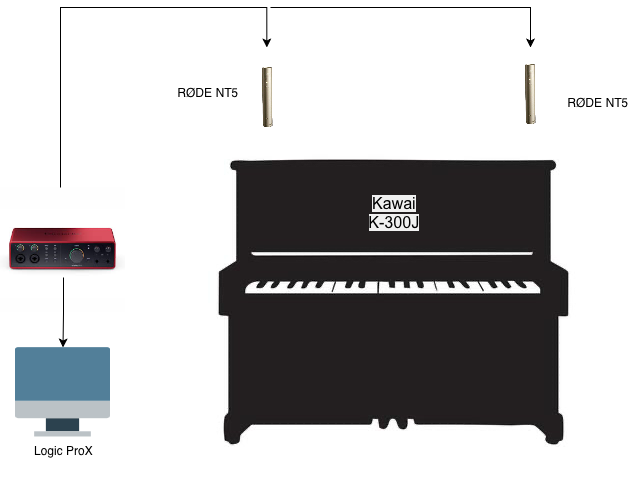
Piano is recorded using a matched pair of RØDE NT5 condenser microphones routed through a Focusrite Scarlett 2i2 audio interface. The two microphones were positioned in spaced configuration to capture the piano in stereo, providing a balanced sense of width while preserving the natural character and dynamics of the instrument.
I have recorded two piano tracks, one for the base parts and one for the rythem/melody
Guitar Setup
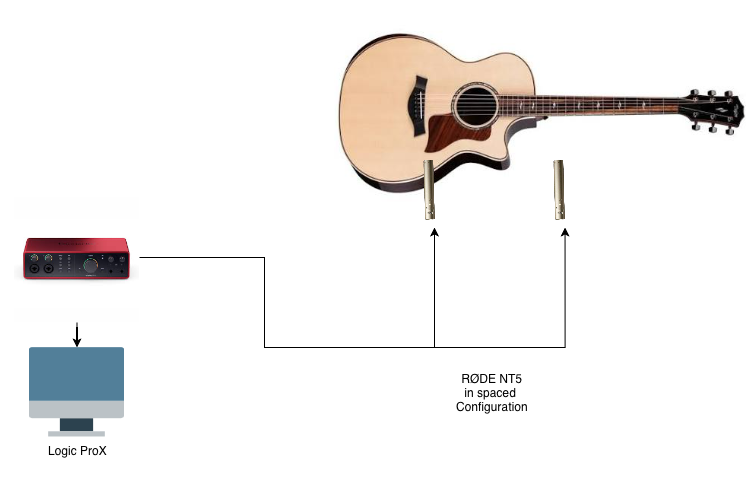
The acoustic guitar using a matched pair of RØDE NT5 condenser microphones routed through a Focusrite Scarlett 2i2 audio interface. The two microphones were positioned in spaced configuration to capture the guitar in stereo, providing a balanced sense of width while preserving the natural character and dynamics of the instrument.
I have recorded three seperate track for tha acoustic guitar, one for strumming, one for finger picking, and one for the melody. The strumming and finger picking tracks are panned left and right to create a stereo effect, while the melody track is kept in the center.
Flute Setup
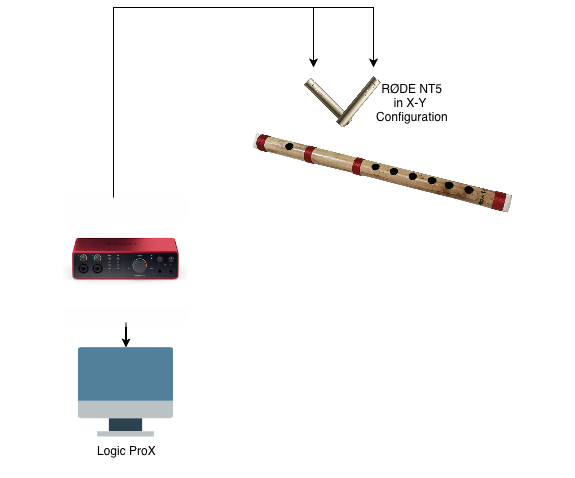
For the flute recording, I used a matched pair of RØDE NT5 condenser microphones in an X/Y stereo configuration, routed through a Focusrite Scarlett 2i2 audio interface. The flute was probably the most challenging instrument to capture, particularly when it came to finding the right microphone placement. I wanted the recording to preserve not only the natural tone and character of the flute, but also some of the subtle breath and air sounds that are an important part of the instrument’s expression. At the same time, the microphone placement needed to be carefully controlled so that these breathing sounds remained subtle and complementary rather than becoming distracting or overpowering the flute itself.
Video Recording Setup
The video was recorded using a Sony A7R V with a selection of different lenses, depending on the shot and framing required. To make the editing and synchronisation process easier, I played the final audio track in the background while recording each video segment. This gave me a consistent audio reference that could later be used to accurately sync the recorded footage with the final audio in post-production.
All of the video footage was recorded with the camera completely stationary and securely mounted on a tripod. Rather than physically moving the camera while recording, I created the impression of camera movement during editing. I achieved this using the Ken Burns effect, combined with manually positioned keyframes in Final Cut Pro.
Again, I am not going to talk about how the video editing was done in Final Cut Pro, as that itself is a very long blog post on it’s own.
Wide Shot
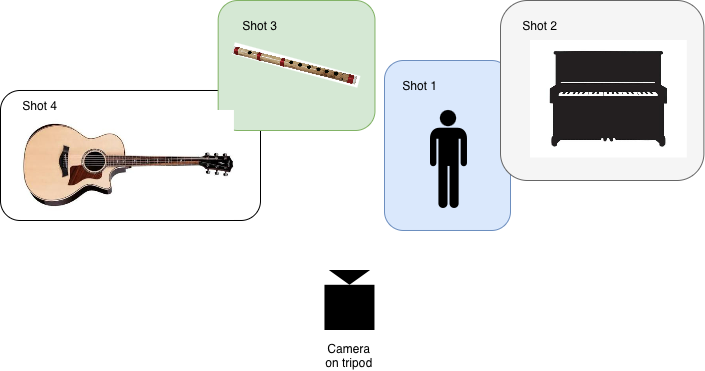
Because this cover involved me playing multiple instruments, I wanted the final video to create the impression of a full band performing together. Rather than simply cutting between different performances, I decided to achieve this by cloning myself within the same scene, with each version of me appearing to play a different instrument.
Although the concept sounds relatively straightforward, recording the footage for this effect was surprisingly challenging—and also one of the more interesting parts of the production. Since all of the performances needed to appear as though they were happening in the same physical space, I had to carefully consider lighting, camera position, framing, angles, focus, exposure, depth of field, and the positioning of each performance. Even small changes between takes could make the compositing process much more difficult later.
For the wide shot, I used a Sony 35mm f/1.4 GM lens mounted on the Sony A7R V, which was secured on a tripod as shown in the figure above. Keeping the camera completely stationary was critical, as even a small change in camera position between takes could make the masking and compositing significantly harder. Before recording, I positioned myself in Scene 1 and used the camera’s smartphone app to set the focus accurately on my face. Once the focus was established, I locked it to prevent the camera from refocusing differently between takes. I also disabled the relevant automatic camera settings, including autofocus and automatic exposure adjustments, so that the focus, exposure, and overall image characteristics remained consistent across all recordings.
I then recorded the four scenes, from Scene 1 through Scene 4, with each take representing a different version of myself playing a different instrument. An important consideration was the amount of overlap between the different performances. I tried to keep the overlap to a minimum because larger overlaps would make the masking process more complicated. However, I deliberately allowed a small amount of natural overlap in places, as completely eliminating overlap can sometimes make the final composite look artificial. A small amount of interaction between the different versions of myself helps make the scene feel more like a genuine band performance.
I then brought all of the footage into Final Cut Pro and composited the different performances using masking. Wherever possible, I used fixed masks, as they provide cleaner and more predictable edges when the subject and camera remain stationary. For smaller areas where the performances overlapped or where the subject’s movement made a simple fixed mask impractical, I used Magic Mask to isolate the subject more precisely.
Close Ups
Close ups were relatively straight forward, nothing fancy to write about there. Again the camera was stationary through out the close-up recordings as well and all movements were created in post-production.